Published on March 24, 2026
By Deeplodoc Team
Guide to Automated Invoice Processing with AI in 2026
A step-by-step guide to transforming your invoice workflow with AI. Learn how to eliminate manual data entry, stop losing documents, and close faster.
Manual invoice handling still eats hours every month for modern businesses. Despite the rapid advancement of digital tools, many finance teams and founders find themselves trapped in a cycle of downloading PDFs, renaming files, and manually typing numbers into spreadsheets.
The fastest wins in financial operations come from capturing documents in one place, standardizing filenames and folders, and using software that reads Gmail and Drive so nothing gets lost between your inbox and your accountant.
If you are a founder, an accountant, or part of a small finance team, you know the drill. Copy-pasting vendors, totals, dates, and VAT from PDFs into Excel or your accounting software steals 8-12 hours every single month. Invoices get lost across different mailboxes, forwarded chains, and personal accounts. Month-end turns into a scavenger hunt instead of a strategic financial review.
This is where automated invoice processing comes in. In this comprehensive, 2,500+ word guide, we will explore how modern technology is eliminating manual data entry, dissect the exact reasons why invoices go missing, provide a framework to audit your current operations, and show you how tools like Deeplodoc can put your accounts payable on autopilot in just 5 minutes.
Chapter 1: The Hidden Costs of Manual Invoice Management
Before diving into the solutions, it is crucial to understand the true cost of doing things the old-fashioned way. Many businesses underestimate the friction caused by manual invoice management because the tasks are spread out over the month in 3-minute increments. But those increments compound into massive operational drag.
The Time Drain and Context Switching
On average, manually processing a single invoice—downloading it from an email, renaming the file, saving it to a folder, opening it, reading the data, and typing that data into a spreadsheet or accounting system—takes between 3 to 5 minutes. If your business processes 100 invoices a month, that is over 8 hours of tedious, mind-numbing work.
But the real cost is context switching. Stopping strategic work to process a single invoice breaks focus. A founder who pauses building a product to download a SaaS receipt is losing far more than 3 minutes of productivity.
The Cost of Human Error
When humans type numbers, mistakes happen. A transposed digit in a VAT amount, a missed decimal point, or an incorrect due date can lead to overpayments, late fees, or compliance issues during tax season. Manual invoice extraction is inherently flawed because human attention wanes during repetitive administrative tasks. Fixing a single reconciliation error at the end of the month can take hours of tracing back through bank statements and email threads.
The "Scavenger Hunt" Month-End
Perhaps the most frustrating aspect of manual processing is the end-of-month scramble. Your accountant needs the documents to close the books, but half of the invoices are buried in email threads, some were sent to a personal email address, and others were downloaded to a random "Downloads" folder and never moved. You spend days chasing documents instead of reviewing your financial health. This delays financial reporting, meaning you are making business decisions based on outdated data.
Chapter 2: How Invoices Get Lost: Top Email Management Mistakes
To fix an invoice workflow, you first need to understand where it breaks. For 90% of businesses, the breakdown happens in the inbox. Email was built for communication, not for document management. Here are the most common mistakes companies make that lead to lost invoices.

Mistake 1: The "Personal Inbox" Trap
When a founder or team member signs up for a new software tool or service, they naturally use their personal company email (e.g., john@company.com). The monthly invoices then flow directly to John. If John is on vacation, leaves the company, or simply forgets to forward the email, the invoice is effectively invisible to the finance team.
- The Fix: Always use a centralized alias like
invoices@company.comorbilling@company.comfor all vendor accounts.
Mistake 2: The Forwarding Chain of Death
When an invoice lands in the wrong inbox, the standard procedure is to forward it to the accountant or the finance alias. However, forwarding strips the original context. Sometimes the attachment gets dropped. Sometimes the thread becomes so long that the actual PDF is buried at the bottom of a 15-message chain. When the accountant tries to search for the vendor's original email address, they can't find it because the sender is now the internal employee.
Mistake 3: The "Downloads Folder" Black Hole
A common manual workflow involves opening an email, clicking "Download" on the PDF, and telling yourself, "I'll move this to the Google Drive folder later." Later never comes. The invoice sits in the local Downloads folder on a single laptop. If that laptop crashes, or if the accountant needs access, the document is inaccessible.
Mistake 4: Inline Invoices and Portal Links
Not all invoices are attached as neat PDFs. Some vendors put the invoice details directly in the body of the email (inline invoices). Others send an email with a link that says "Click here to view your invoice," requiring a login to a separate portal. Manual workflows struggle to standardize these formats. Employees often take screenshots of inline emails or forget their passwords for the portals, leading to missing documentation.
Mistake 5: Lack of Naming Conventions
Even if an invoice makes it to the correct shared folder, it might be named INV_2026_final_v3(1).pdf. When you have hundreds of files with similar, non-descriptive names, finding a specific transaction from six months ago is nearly impossible. A proper invoice capture system must include standardized renaming.
Chapter 3: Checklist: Are You Ready to Scale Your Document Workflow?
How do you know if your current process is holding you back? If you are a growing business, the systems that worked for 10 invoices a month will completely break at 100 or 500 invoices.
Use this expert checklist to evaluate if your business is ready to scale, or if you need to implement automated invoice processing immediately.
1. The Volume Threshold Test
- [ ] Do you process more than 30 invoices or receipts per month?
- [ ] Does your team spend more than 2 hours per month purely on downloading and organizing financial documents?
- [ ] Are you planning to increase your vendor count or software subscriptions in the next 6 months? If you answered yes to any of these, manual processing is already costing you money.
2. The Centralization Test
- [ ] Do 100% of your vendor invoices arrive at a single, dedicated email address?
- [ ] Can your accountant access all original invoice files without having to email you to ask for them?
- [ ] If a key team member left tomorrow, would you still receive all the invoices tied to the tools they managed? If you answered no, your workflow is fragile and heavily dependent on individual human memory.
3. The Audit and Compliance Test
- [ ] Are all your invoices stored in a secure, cloud-based environment (like Google Drive) with restricted access?
- [ ] Do you have a consistent naming convention for every file (e.g.,
YYYY-MM-DD_Vendor_Amount.pdf)? - [ ] Can you locate the original invoice for any specific bank transaction within 60 seconds? If you answered no, an audit will be a highly stressful, time-consuming, and potentially expensive event.
4. The Data Accuracy Test
- [ ] Do you frequently find discrepancies between your accounting software and your bank statements at month-end?
- [ ] Have you ever paid a vendor late because an invoice was lost in an inbox?
- [ ] Have you ever double-paid an invoice because it was submitted twice by different team members? If you answered yes, manual data entry is failing your business.
If you failed multiple points on this checklist, it is time to transition from manual labor to invoice AI.
Chapter 4: What is Automated Invoice Processing?
Automated invoice processing is the use of software to automatically receive, extract data from, and organize vendor invoices without human intervention. It transforms an unstructured document (like a PDF attached to an email) into structured, actionable data.
To understand how this works, we need to look at the three core pillars of the process:
1. Invoice Capture
Invoice capture is the first step. It involves automatically identifying and retrieving invoices from their source. In the modern business environment, the vast majority of invoices arrive via email. A smart automated system connects directly to your inbox (like Gmail), scans incoming messages, identifies which emails contain invoices, and securely pulls those documents into the processing pipeline. It ignores your personal emails, newsletters, and spam.
2. Invoice Data Extraction
Once the document is captured, the system needs to read it. Traditional systems used Optical Character Recognition (OCR) combined with rigid templates. If a vendor moved their "Total Amount" field one inch to the left, the template broke.
Today, invoice data extraction relies on Artificial Intelligence. AI invoice processing doesn't look for specific coordinates on a page; it understands context. It knows what a "Due Date" looks like, regardless of whether it's in the top right corner or buried in a table at the bottom of the page.
3. Workflow and Organization
Extracting the data is only half the battle. A true invoice workflow automatically routes that data and the original document to the right place. For many small businesses, this means saving the original PDF and the extracted data into a perfectly organized Google Drive folder, ready for the accountant to review.
Chapter 5: The Technology: From Legacy OCR to Invoice AI
To truly appreciate the value of modern automation, you need to understand the technological leap that has occurred in the last few years. The shift from manual entry to template-based OCR, and finally to invoice AI, represents a massive leap in productivity for finance teams.
Why Traditional OCR Failed Small Businesses
Legacy Optical Character Recognition (OCR) software was built for massive enterprises processing thousands of identical invoices from a few massive suppliers. It relied on "Zonal OCR."
To use it, an IT professional had to draw a digital box on a screen around the "Total" field and tell the software, "Always look in this exact 2x2 inch square for the total amount." This is called a template.
If you bought software from a new vendor, someone had to map out a new template. If an existing vendor redesigned their invoice and moved the total to the next page, the template broke, and the invoice failed to process. For small businesses with hundreds of different, occasional vendors (SaaS tools, freelancers, one-off purchases), this setup and maintenance time completely negated any time savings.
The Power of Modern Invoice AI
Modern invoice AI is template-free. It uses Large Language Models (LLMs) and advanced computer vision trained on millions of different invoice layouts across multiple languages and formats.
When an AI looks at a document, it doesn't look for coordinates. It uses spatial understanding and semantic context. It knows that the word "Total" followed by a currency symbol and a number usually represents the gross amount. It can differentiate between a "Shipping Date," an "Issue Date," and a "Due Date" based on the context of the surrounding words.
Because of this, modern invoice extraction can reliably identify:
- Supplier Name
- Invoice Number
- Issue Date
- Due Date
- Net Amount
- VAT / Tax Amount
- Gross Amount
- Currency
It can do this across PDFs, images (like a photo of a receipt taken on a phone), download links, and even when the invoice details are just written in the body of the email. This means zero setup time for new vendors. The AI just works, out of the box, from day one.
Chapter 6: Building the Perfect Invoice Workflow
If you want to stop digging through hundreds of invoice emails and hand off perfect folders to your accountant, you need to establish a streamlined invoice workflow. Here is the step-by-step blueprint used by top-performing finance teams.
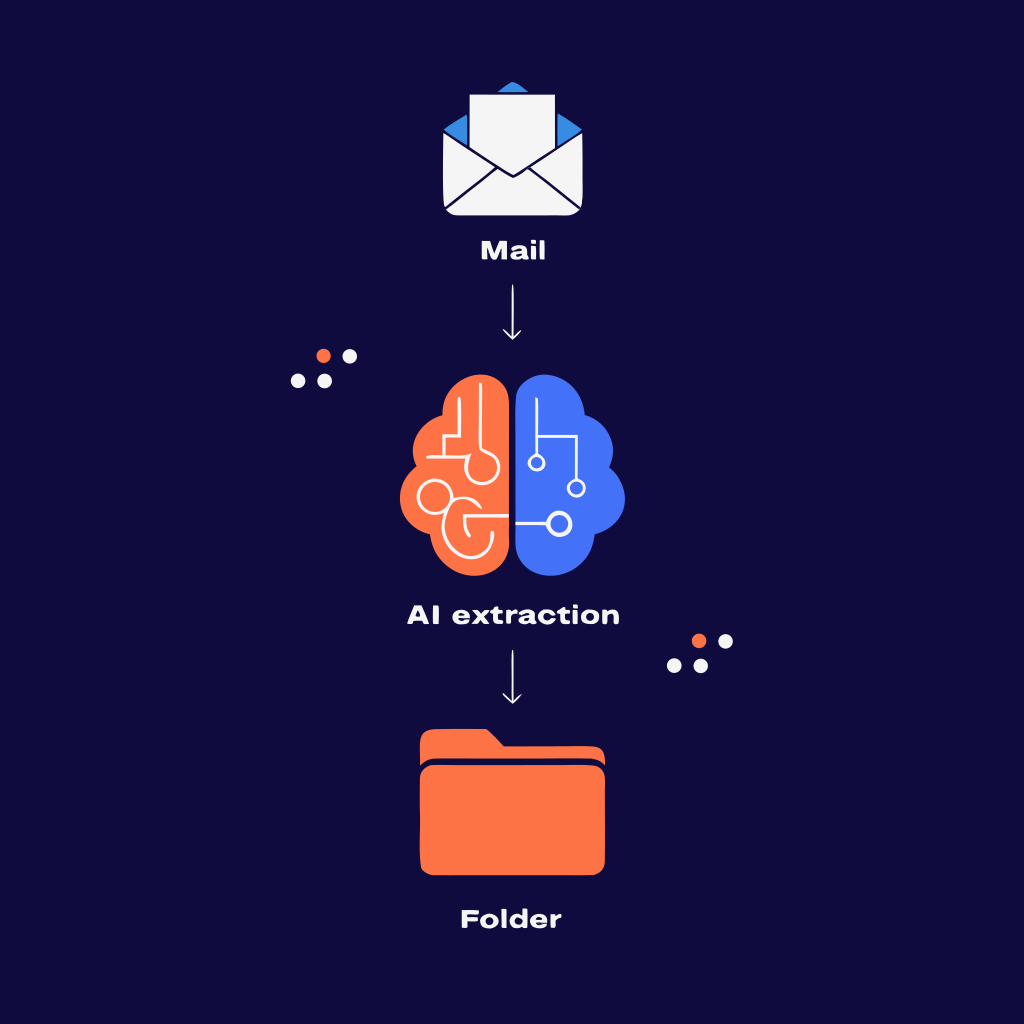
Step 1: Centralize Your Inbox (The Foundation)
As discussed in Chapter 2, the biggest point of failure is fragmentation.
- Actionable Tip: Create a dedicated alias (e.g.,
invoices@yourcompany.com). Update your billing details in all your SaaS apps to use this email. Ask all contractors to send their bills there. If vendors forget, set up auto-forwarding rules in your team's personal inboxes to silently route attachments to the central address.
Step 2: Automate the Capture
Do not rely on a human to open the invoices@ inbox and download attachments. Use a tool that connects directly to your email provider (like Gmail) via secure OAuth 2.0. The tool should quietly monitor the inbox in the background, identify emails containing invoices, and pull them out automatically without marking the email as read or disrupting your normal email flow.
(If you are currently doing this manually, read our guide on 3 ways to automatically save invoices from Gmail to Google Drive to see the technical differences between scripts, Zapier, and AI).
Step 3: Implement Smart Extraction
Once the invoice is captured, your software should instantly perform invoice data extraction. It should read the PDF or image and pull out the critical financial data without you having to highlight fields or draw boxes. It should be able to handle multiple currencies and different tax structures automatically.
Step 4: Standardize Storage and Naming Conventions
Your accountant does not want a folder filled with files named INV-2026-final-v2.pdf and scan_001.jpg. They need consistency to do their job efficiently.
Your automated workflow should automatically rename files based on the extracted data. A best practice is: YYYY-MM-DD_VendorName_GrossAmount.pdf.
The system should then organize them into folders by month and year (e.g., Finance / 2026 / 03 - March).
(Not sure how to organize your files? Check out our templates for the ideal Google Drive folder structure for accounting).
Step 5: The Handoff and Audit Trail
With everything captured, extracted, and organized in a cloud storage system like Google Drive, handing off to your accountant takes one click. You simply share the folder. They get the original files for compliance and an organized dataset (often a synced spreadsheet) for reconciliation.
Crucially, you must maintain an audit trail. A good system will store the original file, the extracted data, and a processing timestamp together, so if an auditor ever asks, "Where did this number come from?", you have the exact source document linked to the data point.
Chapter 7: How Deeplodoc Automates Your Invoices in 5 Minutes
Building this perfect workflow used to require expensive enterprise software, a dedicated IT team, or complex Zapier integrations that broke every time an API updated.
We built Deeplodoc to solve this exact problem for founders, accountants, and small finance teams. We don't try to replace your accounting software like QuickBooks or Xero; we sit perfectly between your chaotic inbox and your clean accounting books, acting as an intelligent bridge.
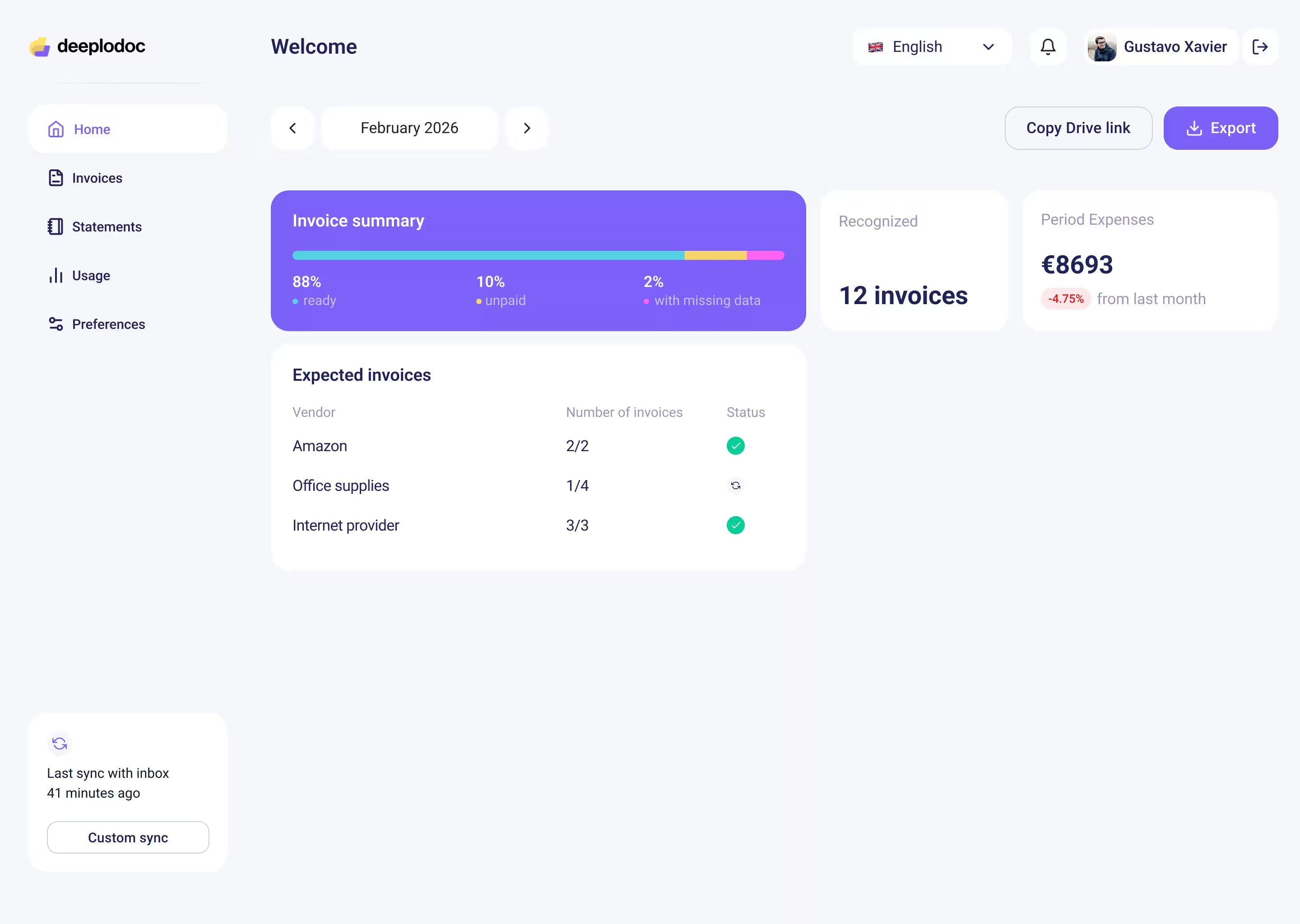
Here is how Deeplodoc transforms your month-end process from a nightmare into a non-event:
1. One-Click Gmail Connection
Setup takes seconds. You connect your Gmail account securely using Google Verified OAuth. Deeplodoc only ever looks at emails that contain invoices—nothing else. This completely automates your invoice capture. You don't have to change how you work; you just let the software run in the background.
2. Smart Extraction from Any Format
Whether your vendor sends a PDF, an image, a download link, or just pastes the bill into the email body, our invoice AI reliably extracts the supplier, invoice number, dates, and amounts (Net, VAT, Gross). No templates required. No manual mapping. It works on day one.
3. Perfectly Organized in Google Drive
Invoices quietly land in your Google Drive. You get the original file and the extracted data, grouped by month with human-readable naming conventions. You get a complete audit trail—we store the original file, extracted data, and processing timestamp together, so you always have full context.
4. Clear Spend Visibility
Need to find out how much you spent on software last March? Instead of searching through email threads, you can search vendors, amounts, and dates in minutes directly within your organized Drive folders or the Deeplodoc interface.
Chapter 8: The ROI of Automated Invoice Processing
Is it worth automating? Let's look at the hard numbers and the soft benefits.
The Financial ROI
If you process just 100 invoices a month, manual processing takes roughly 8 hours. At a conservative administrative rate of €25/hour, that is €200 a month spent just on data entry.
With Deeplodoc's Growth plan at just €19/month (which covers up to 300 invoices), the return on investment is immediate and massive. You are trading €200 of manual labor for €19 of software.
The Strategic ROI
But the real ROI isn't just financial. It is about resource allocation and peace of mind.
- For Founders: You get your Monday mornings back. You can focus on growing the business, talking to customers, and building products instead of doing low-value admin work. (You also protect your runway by avoiding premature scaling—read why your existing Google Workspace is all the ERP you need right now).
- For Finance Teams: You eliminate data entry errors, prevent duplicate payments, and have clear, real-time visibility into company spend.
- For Accountants: You receive perfectly organized, accountant-ready folders on the 1st of the month. You can close the books faster with fewer surprises, less time spent chasing clients for missing documents, and more time providing strategic financial advice.
Conclusion: Stop Chasing Documents Today
Manual invoice data extraction is a relic of the past. In 2026, there is absolutely no reason for highly skilled professionals to spend their time copy-pasting numbers from PDFs into spreadsheets. The technology is too accessible, too affordable, and too accurate to ignore.
By implementing automated invoice processing, you create a seamless, error-free pipeline from your inbox to your accountant. You gain complete visibility over your spend, ensure a perfect audit trail, and reclaim hours of your time every single month. You move from reactive document chasing to proactive financial management.