Published on March 27, 2026
By Deeplodoc Team
Why Gmail & Google Drive is the Best ERP for Small Teams
Discover why startups and small businesses should use Gmail and Google Drive as their lightweight ERP instead of buying expensive enterprise software.
When launching a startup, founders often fall victim to the "premature scaling" syndrome. You read articles about enterprise resource planning, watch demos of massive software suites, and suddenly you are convinced you need a $500/month ERP system—even though your business only processes 20 transactions a month.
The truth is, buying expensive software too early creates unnecessary overhead. You spend more time configuring the tool than actually running your business.
But what if you already have the foundation of a powerful free business management system? If you use Google Workspace, you do. In this guide, we will show you how to turn the basic combination of Gmail and Google Drive into the ultimate free ERP for small business, provided you add the right "glue" to hold it all together.
What is an ERP, and What Does a Startup Actually Need?
Enterprise Resource Planning (ERP) sounds intimidating. In the corporate world, it refers to massive, monolithic systems like SAP or Oracle that manage everything from global supply chains to human resources.
But strip away the corporate jargon, and what does a startup actually need an ERP to do in its first few years? It boils down to three core functions:
- Vendor Communication: A reliable way to talk to suppliers, receive invoices, and manage service agreements.
- Reliable File Storage: A secure, centralized place to store financial documents, contracts, and receipts so they don't get lost on a local hard drive.
- Basic Accounting & Record Keeping: A clear trail of what was bought, when, and for how much, ready to be handed off to an accountant.
You don't need a complex dashboard to achieve this. You just need a structured workflow. And the tools you already use every day are perfectly capable of handling it.
The Role of Gmail in a "DIY ERP"
In your makeshift Google Workspace for business ERP, Gmail acts as the central communication and intake hub.
Think about it: 99% of your business transactions already start or end in an email. When you sign up for a new SaaS tool, the receipt goes to Gmail. When a freelancer finishes a project, they email you their invoice. When you negotiate a contract, the thread lives in your inbox.
Instead of forcing vendors to log into a clunky third-party portal to submit invoices, you simply use email. By setting up a dedicated alias (like invoices@yourstartup.com), Gmail becomes the single source of truth for all incoming financial data. It is universally accessible, instantly searchable, and completely free.
The Role of Google Drive
If Gmail is the intake hub, Google Drive is the secure vault.
A startup needs a document management system that offers version control, strict access permissions, and cloud reliability. Google Drive provides all of this out of the box.
When set up correctly, Drive acts as your digital filing cabinet. You can create a structured hierarchy (e.g., Finance / 2026 / 03 - March), restrict access so only founders and the external accountant can view the files, and ensure that every document is backed up securely.
It is the perfect repository for your financial records, ensuring compliance and peace of mind without the enterprise price tag.
The Missing Link: Automation Between Them
So, you have Gmail receiving the invoices and Google Drive ready to store them. What is the problem?
The missing link is automation.
Without a way to connect these two powerful tools, your "free ERP" quickly devolves into a manual nightmare. The ecosystem falls apart into routine, soul-crushing tasks:
- Opening the email.
- Downloading the PDF attachment to your local
Downloadsfolder. - Renaming the file so your accountant can actually read it (changing
INV-004-final.pdfto2026-03-26_Stripe_100.pdf). - Uploading it to the correct Google Drive folder.
- Manually typing the data into a spreadsheet.
This manual Google document workflow automation (or lack thereof) is where mistakes happen. Files get lost, data is entered incorrectly, and founders waste hours doing administrative busywork instead of building their product.
(Curious about the technical ways to bridge this gap? Read our breakdown on how to automatically save invoices from Gmail to Google Drive).
Adding Deeplodoc: The "Glue" That Makes It Work
To turn Gmail and Google Drive into a true, automated ERP, you need an intelligent bridge. You need a tool that treats an invoice not just as a file, but as financial data.
This is where Deeplodoc comes in.
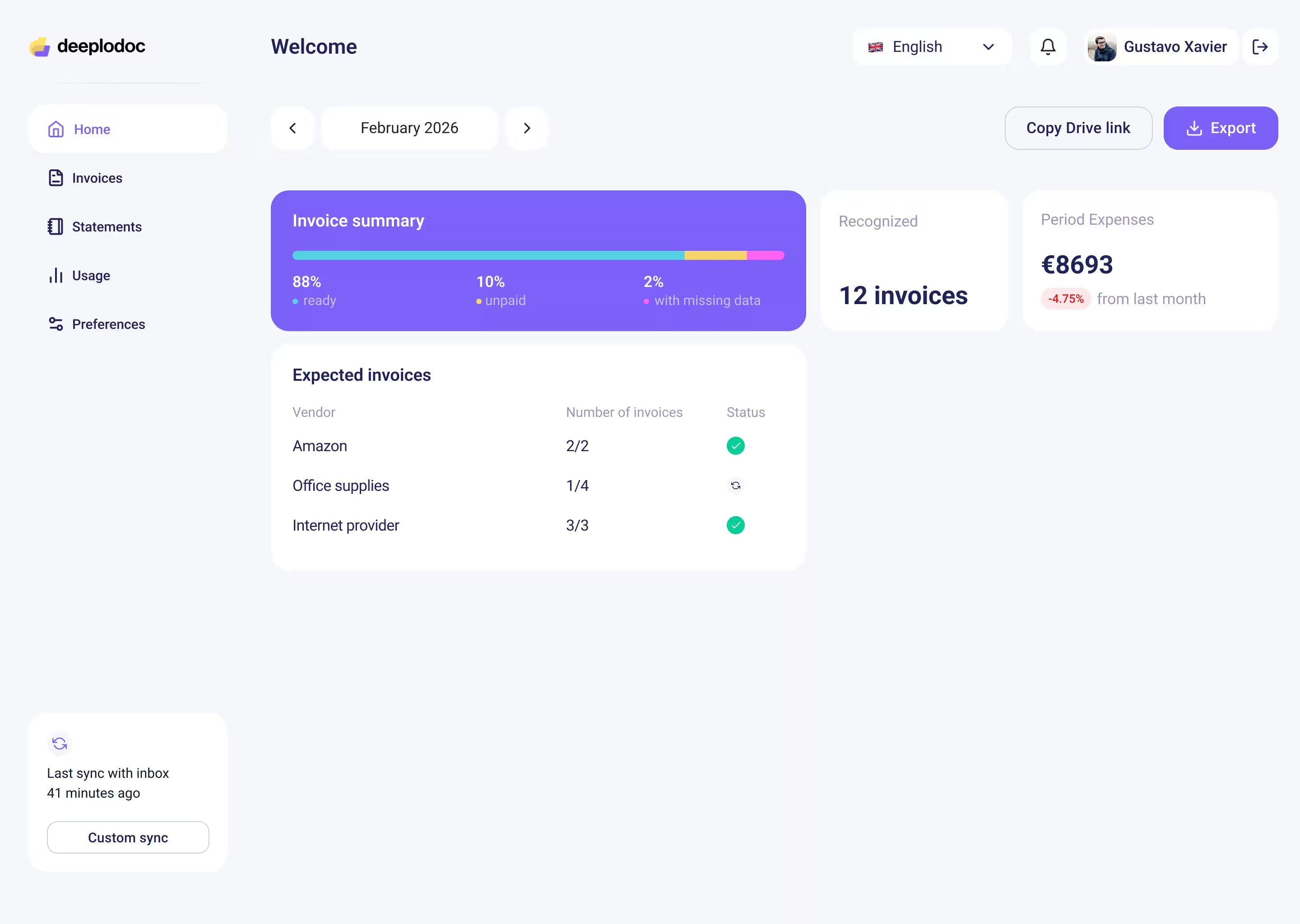
For just $19 a month, Deeplodoc acts as the missing link, turning a set of basic Google apps into a smooth, automated document processing pipeline.
Here is how it transforms your workflow:
- Silent Monitoring: It connects to your Gmail via secure OAuth and quietly watches for incoming invoices.
- AI Extraction: It doesn't just move files; it reads them. Using advanced AI, it extracts the vendor name, date, and amounts—without you ever having to set up a template. (Learn more about how AI is replacing legacy OCR in our Ultimate Guide to Automated Invoice Processing).
- Perfect Organization: It automatically renames the PDF based on the extracted data and saves it directly into the correct month's folder in your Google Drive.
Suddenly, your free Google tools are performing the exact same accounts payable functions as an expensive ERP system, but with zero configuration and zero manual data entry.
Conclusion: Scale Smart, Not Fast
You don't need to spend thousands of dollars on complex software to run your startup's finances efficiently. By leveraging the tools you already have—Gmail and Google Drive—and adding a smart automation layer, you can build a flawless, scalable system.
Stop doing manual data entry and start treating your Google Workspace like the powerful ERP it can be.